Secondary captures
A Secondary Capture is a new image series created from existing original images, exactly as they appear on screen at the moment of capture (within the active, displayed series).
|
Restriction |
|

|
Secondary captures are available to anyone who has access to the study. Creating and deleting secondary captures, on the other hand, depend on the permissions for a specific user or group for the source of the study.
|
1. To create a secondary capture of the image you have currently displayed, click on the camera icon at the bottom of the viewport.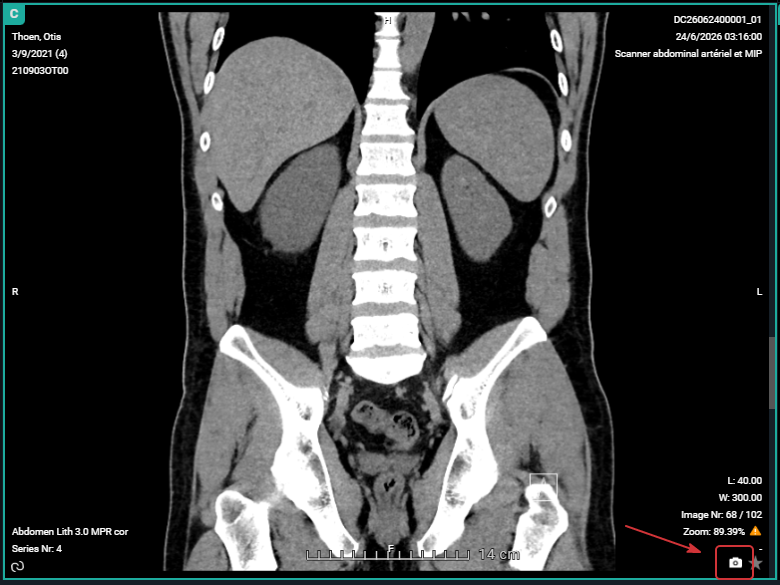
This will create a new DICOM image that is basically a screenshot of the image how it is displayed in your viewport, including zoom level/pan, window level, rotations/flips, and annotations.
2. A pop-up window opens where you can name the secondary capture. By default, the original series description with the prefix SC- will be used. Set a description and click CREATE.
3. A pop-up message notifies you that uploading is in progress. Once the upload was successful, you will find the new secondary capture series in the series picker.
Depending on your permissions, the following icons are displayed in the viewport of your secondary capture, allowing the following actions:
|
Icon
|
Description
|
|---|---|
|
Delete this secondary capture.
|
|
 |
Navigate back to the original image. If a secondary capture has been created on volume rendering or MPR, this will be the first image in the series.
|
|
By default, every secondary capture will be marked as a key image as indicated by the yellow star. Click the star to unmark it.
|
|
Important |
|

|
It is not possible to create a secondary capture of a secondary capture.
|