Overview
Within the personal dictionary, you can see an overview of all your added words.
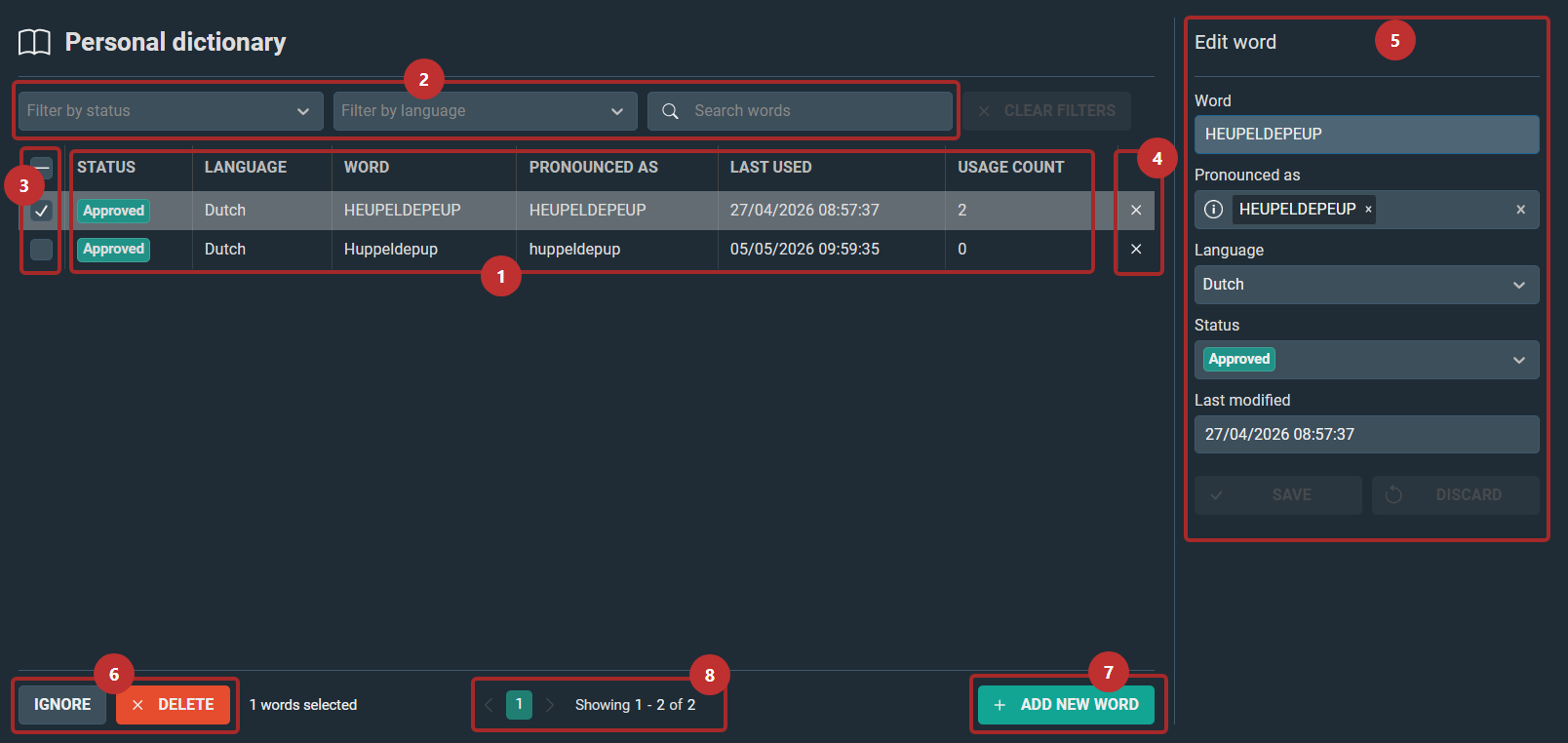
Number | Element/Functionality | ||||
|---|---|---|---|---|---|
1 | The list of all your added words. Your personal dictionary is limited to 500 words. The table comprises the following columns: • Status ◦ Approved: Default option. ◦ Ignored: You have access to the word, you can see how many times the word is used in your reports, but it will not be added to your dictionary when it is used again. Just the usage count goes up. • Language • Word: The written form of the word. • Pronounced as: Your pronunciation of the word. • Last used: This might be helpful if you have too many words in your personal dictionary and need to start deleting some. • Usage count: Indicates how many times this word has been used since it was added to your dictionary. | ||||
2 | Filter your list by status, language, or search for specific words. | ||||
3 | Select/deselect words to edit or delete them. | ||||
4 | Delete option | ||||
5 | This panel pops up when you select a word to edit it or click on ADD NEW WORD. Edit or fill in the fields as needed.
| ||||
6 | Ignore or delete your selected word(s). These buttons only become available once you have selected one or multiple words. | ||||
7 | Add a new word. You can enter the details of this word in the panel on the right. | ||||
8 | This page uses pagination. When there are more than approximately 20 words, the next page will be created. | ||||
